
OpenAI is rolling out a new feature called ‘Library’ for ChatGPT, which allows you to store your personal files or images on OpenAI’s cloud storage.
OpenAI says ChatGPT Library requires Plus, Pro, and Business. It’s rolling out to customers across the world except the European Economic Area, Switzerland, and the United Kingdom.
I refreshed the ChatGPT web, and the Library automatically showed up on the sidebar.
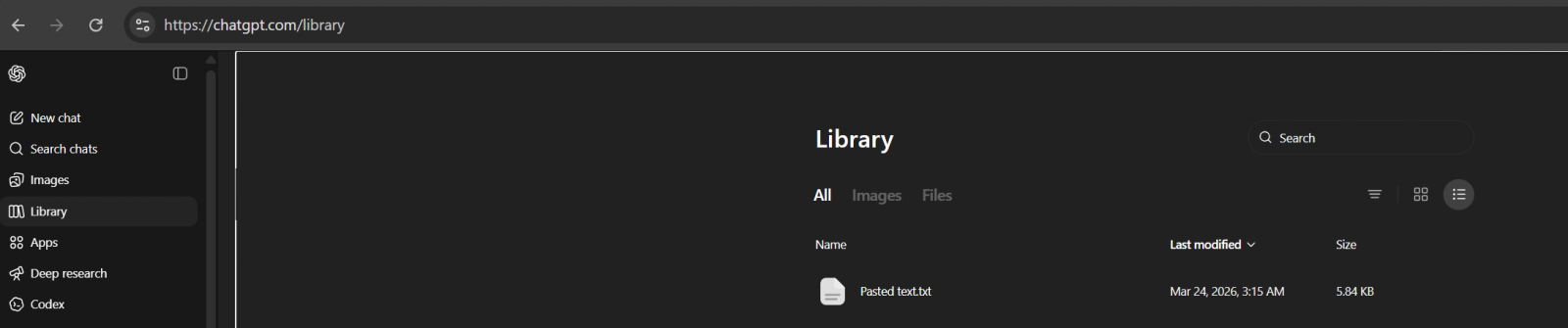
To my surprise, it’s actually not empty, as ChatGPT has already saved some of the files I uploaded in the last two weeks.
Turns out it’s an expected behaviour. By default, GPT will save your uploaded files in a dedicated, secure location, and they can be used for reference in a future chat.
“ChatGPT automatically saves uploaded and created files, including files uploaded in chats (for example: documents, spreadsheets, presentations, and images) in a dedicated, secure location so they can be easily accessed later,” OpenAI noted in a document.
On the other hand, if you use ChatGPT to generate AI images, they will continue to appear in the Images tab.
The Library section only has files you uploaded, and you can upload files by following these steps:
- Open the composer menu (the attachment/add button).
- Select Add from library.
- Choose the file you want to use.
OpenAI says ChatGPT automatically saves uploaded and created files, including files uploaded in chats, in a dedicated, secure location so they can be easily accessed later.
This means files are saved to your account until you delete them manually, but deleting a chat containing a file does not delete those files saved to Library.
To delete a file:
- Select the file in the “Library” tab
- Click Delete, or click the trash icon next to the file.
OpenAI will remove files from its servers within 30 days of deletion.
It’s unclear why it takes nearly a month to purge files, but it is likely due to legal reasons.

Red Report 2026: Why Ransomware Encryption Dropped 38%
Malware is getting smarter. The Red Report 2026 reveals how new threats use math to detect sandboxes and hide in plain sight.
Download our analysis of 1.1 million malicious samples to uncover the top 10 techniques and see if your security stack is blinded.
Related Articles:
ChatGPT Pulse is coming to the web, but no word on free or Plus roll out
OpenAI is retiring famous GPT-4o model, says GPT 5.2 is good enough
ChatGPT Temporary chat feature is getting a much-needed upgrade
OpenAI says ChatGPT ads are not rolling out globally for now
OpenAI’s ChatGPT ad costs are on par with live NFL broadcasts