Google is rolling out a new feature that allows users in the U.S. to change their @gmail address or create a new alias.
This feature was first spotted in October 2025 and showed up on some Google accounts by the end of the year, but it was not available in the United States.
Starting today, Google says you can customize your @gmail address in the United States.
Google has always allowed you to change aliases for your emails, but it blocked users from changing their @gmail.com address, that is, the name that appears before @gmail.com.
“The email address associated with your Google Account is the address you use to sign in to Google services. This email address helps you and others identify your account,” Google explained in a support document.
“If you’d like, you can change your Google Account email address that ends in gmail.com to a new email address that ends in gmail.com.”
How to change the username of your Google @gmail address
You can go to Google Account settings, choose to change your Google email, and enter the new username.
As always, you’ll need to choose a username that is unique and not already used by your Google account.
Once you’ve decided on a username, click Change email, and then select Yes, change email.
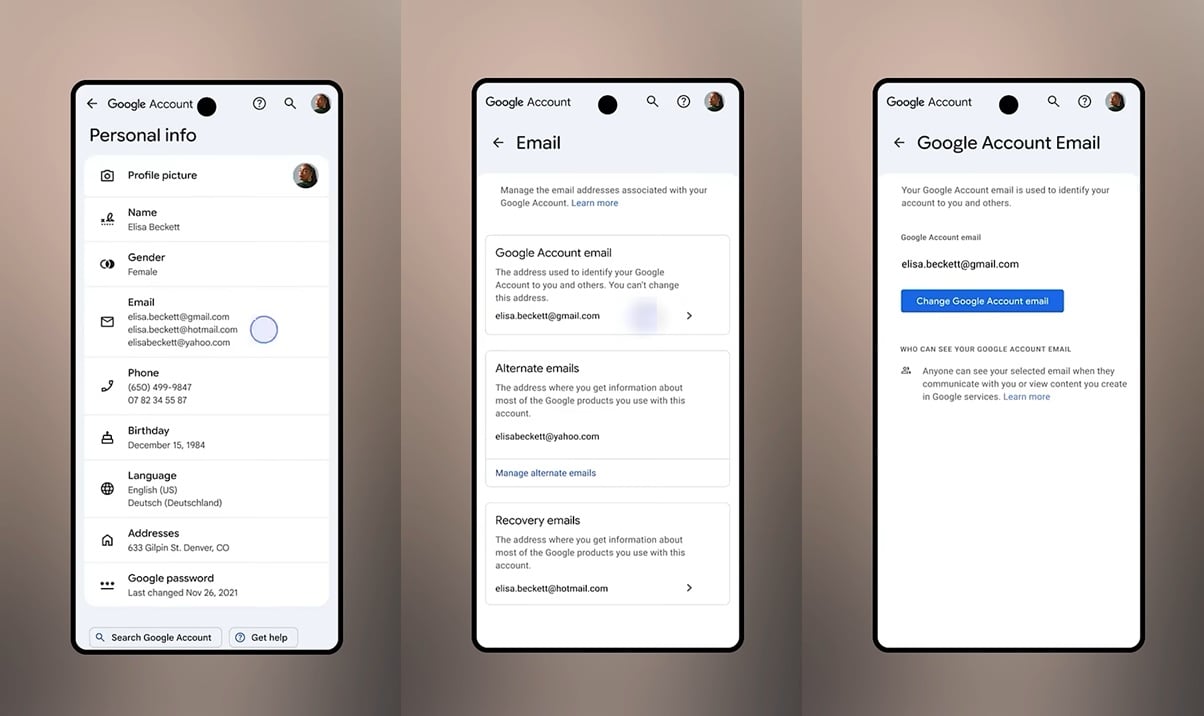
After applying the changes, your old address will automatically change to the new username, and it will reflect across your apps and services like Gmail, Photos, Drive, and more.
If you don’t see the toggle, it means the feature is not available for your account or region yet.
Google hasn’t clarified whether the feature has rolled out widely outside the US, but it doesn’t appear to be the case.
Regardless, when the feature does show up, and you change the address, Google won’t delete your old username or allocate it to new accounts, as it will remain linked to your current account.

Automated Pentesting Covers Only 1 of 6 Surfaces.
Automated pentesting proves the path exists. BAS proves whether your controls stop it. Most teams run one without the other.
This whitepaper maps six validation surfaces, shows where coverage ends, and provides practitioners with three diagnostic questions for any tool evaluation.
Related Articles:
Microsoft fixes bug causing Classic Outlook sync issues with Gmail
Microsoft investigates classic Outlook sync and connection issues
FBI confirms hack of Director Patel’s personal email inbox
Microsoft fixes Outlook Classic crashes caused by Teams Meeting add-in
Microsoft Exchange Online service change causes email access issues